Discord Formatting
Discord also offers various formatting options to enhance your messages. These tools allow you to structure text, highlight important information, and improve overall readability. Here's an overview of the most commonly used formatting styles and how you can use them effectively in your messages.
Text Formatting
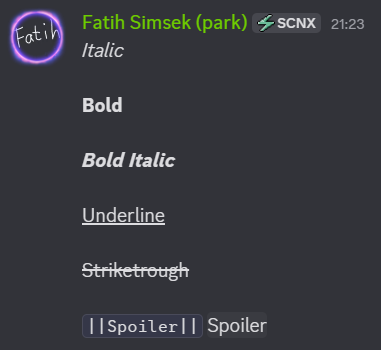
These formatting options represent different styles for messages that you can use in Discord to improve readability and structure. Discord message formatting allows you to emphasize important information, highlight key points, and organize text more effectively. By using these basic message styles, you can make your messages easier to understand, more visually appealing, and more engaging for other users. The following section provides an overview of the most commonly used formatting styles available in Discord.
| Style | Syntax | Result |
|---|---|---|
| Italic | *Text* or _Text_ | Text |
| Bold | **Text** | Text |
| Bold Italic | ***Text*** | Text |
| Underline | __Text__ | T͟e͟x͟t |
| Strikethrough | ~~Text~~ | |
| Spoiler | See screenshot | See screenshot |
Headings & Structure
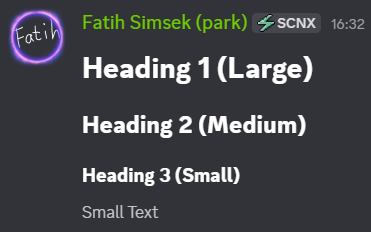
With these formatting options, you can change the size of the text, making it easier to structure and organize your messages. Adjusting text size helps highlight important information, improve readability, and create clear visual hierarchies within your messages.
Important: There must be a space after the # or -# characters for the formatting to work correctly.
# Heading 1 (Large)
## Heading 2 (Medium)
### Heading 3 (Small)
-# Small Text
Lists & Quotes
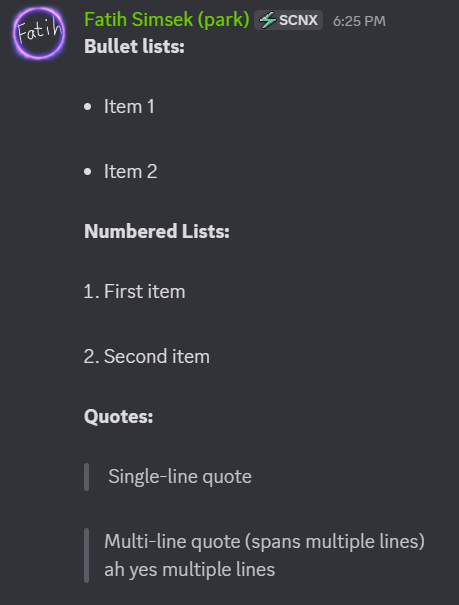
With these formatting options, you can structure your text using lists or quotes, making your messages clearer and easier to read. Lists help organize information into concise points, while quotes are useful for highlighting references, replies, or important statements. There are many different ways to create lists and quote text, allowing you to format your messages in a clear and well-structured manner.
- Bullet lists:
- Item 1
* Item 2
- Numbered lists:
1. First item2. Second item
- Quotes:
> Single-line quote-
>>> Multi-line quote
Ah yes multiple lines
Links & Code
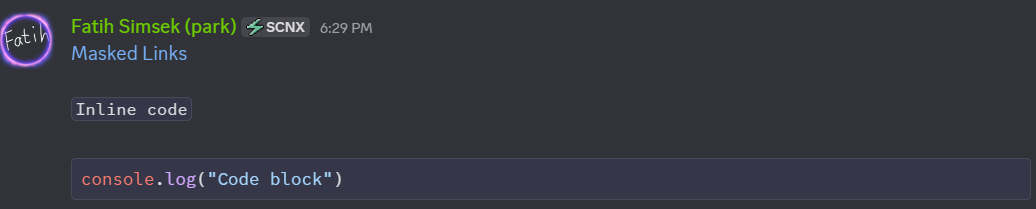
With these formatting options, you can change the behavior and appearance of a message. They allow you to control how a message looks and how it is perceived, helping you emphasize actions, highlight important content, and improve overall readability.
- Masked links:
[Google](https://www.google.com) - Inline code:
`command` - Code block:
```js
console.log("Code block")
```
When using code blocks, it is possible to specify the programming language used for syntax highlighting. In this code block, we use JavaScript (hence the js in the first line). You can also specify other programming languages by simply replacing js with the desired language (e.g. py for Python, html for HyperText Markup Language, etc.).
Timestamps
Dynamic timestamps in Discord allow you to display times and dates that automatically adapt to the user’s time zone, making messages more informative and context-aware. These timestamps are especially useful for events, deadlines, reminders, or any message where the timing needs to be clear for users across different regions. By using dynamic timestamps, you can improve clarity and engagement in your Discord server.
Timestamps use UNIX time, which is a system that counts the number of seconds that have elapsed since January 1, 1970 at 00:00:00 UTC (also known as the Unix epoch). UNIX time is widely used in programming, databases, APIs, and server logs because it provides a simple, consistent, and timezone-independent way to represent points in time.
Examples of Discord Timestamp Formatting:
<t:1737835851:t>→ Time (short format)<t:1737835851:D>→ Date (long format)<t:1737835851:R>→ Relative time (e.g., “5 minutes ago”)
You can customize and generate timestamps exactly how you want using the Discord Timestamp Generator.
