Moving from V2
Custom Commands V3 is a new way to build automations, and you switch it on per server. Your V2 custom commands aren't touched: they keep running and stay editable next to V3. You can switch back to V2 at any time.
This page explains how to turn V3 on, what changes for you, and what does and doesn't carry over.
Can my server use V3?
V3 is in beta, and you join it yourself from the dashboard. Open the Custom Commands page of your server:
- If V3 isn't on yet, you'll see the card "Custom Commands V3 is in beta". Click Join the beta to open the opt-in page, or See what V3 can do to learn more first.
- If your server was already unlocked, you'll see the card "Custom Commands V3 is available for your server" above your V2 commands, with an Explore V3 button.
- If we have paused joining, you'll see "Custom Commands V3 isn't available yet". Your V2 commands keep working.
If someone sent you an invite link for Custom Commands V3, open it and pick your server. That makes the server eligible. You still turn V3 on yourself afterwards.
Turn on V3
Only the server owner and co-owners can turn on V3. It's a server-wide decision, because flows run with your bot's full Discord permissions.
- On the Custom Commands page, click Explore V3.
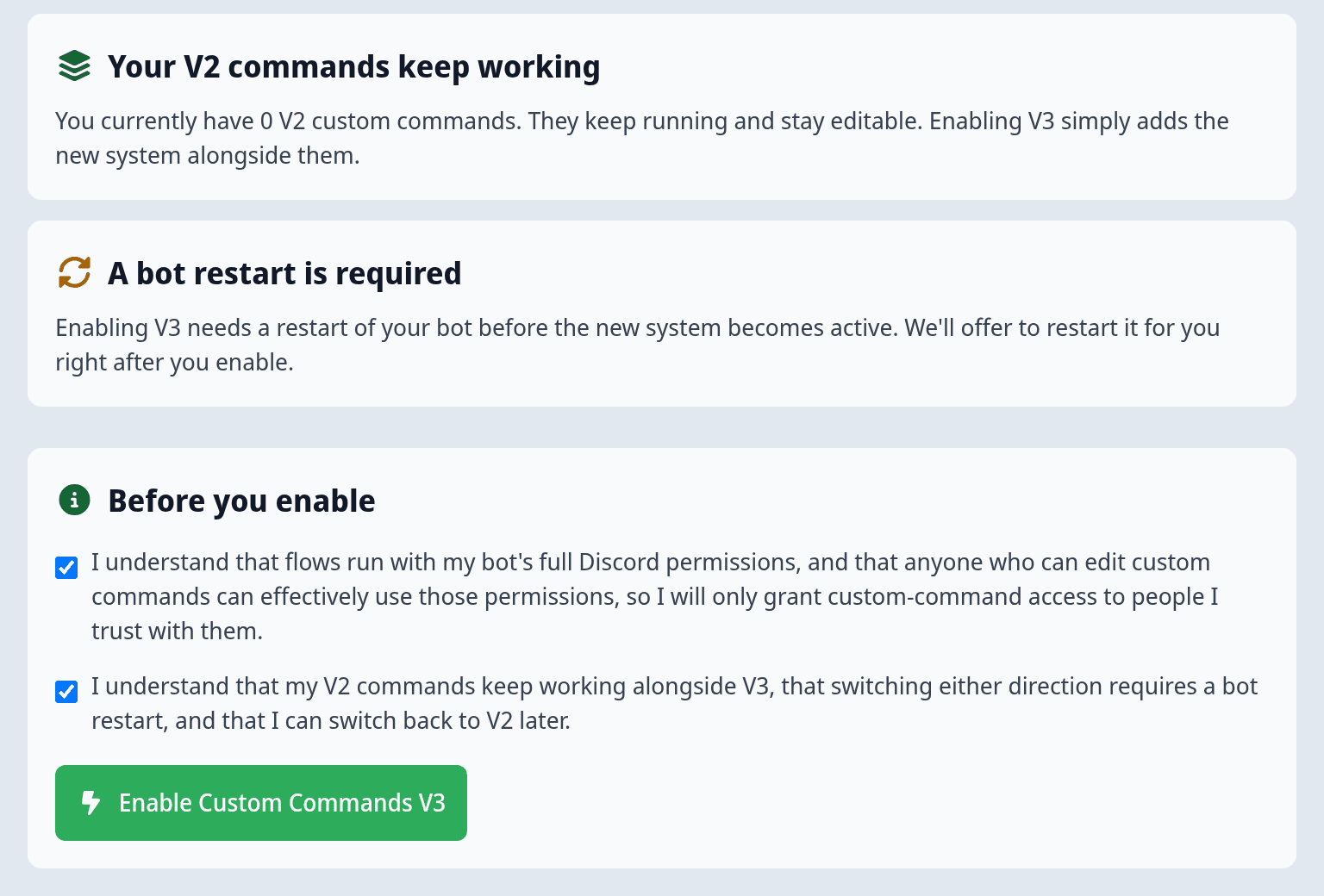
- Read the page. It explains what V3 is, What you're taking on, that Your V2 commands keep working, and that A bot restart is required.
- Under Before you enable, tick both boxes: that flows run with your bot's full permissions and that anyone who can edit custom commands can use them, and that V2 keeps working and you can switch back.
- Click Enable Custom Commands V3.
- Click Restart bot now. V3 becomes active once your bot has restarted. Your V2 commands keep running throughout.
- Click Go to the V3 overview.
If something goes wrong
| What you see | Cause and fix |
|---|---|
| "Only the server owner or co-owners can enable this" | You're not the owner or a co-owner. Ask one of them to open the page. |
| The Enable Custom Commands V3 button is greyed out | Tick both boxes under Before you enable. |
| "We couldn't enable Custom Commands V3" | Try again in a moment. |
| "Too many Custom Commands V3 changes for this server" | You turned V3 on and off several times in a row. Wait a while, then try again. |
| "This bot was just restarted" after Restart bot now | V3 is already turned on, but your bot can't restart again so soon. Wait until the time shown, then restart it from your bot's dashboard. |
| Your V3 flows don't run at all | Your bot hasn't restarted since you turned V3 on. Restart it. |
Once V3 is on, anyone who can edit custom commands can build flows that use your bot's permissions. That includes trusted admins with the Custom-Bot: Change and Reload Configuration / Custom Command permission. Through a flow, they could assign roles or ban members even if they couldn't do that themselves. Review your trusted admins before you turn V3 on.
V2 and V3 side by side
After you turn on V3, the Custom Commands page opens the V3 overview. Your V2 commands are still there:
- Your V2 commands keep running. Nothing about them changes.
- You can still edit them. On the V3 overview, under Data & history, click Legacy V2 commands. A banner reminds you that you're looking at your V2 commands.
- V2 keeps its own limits. The number of V2 commands you can have turned on still depends on your plan, as before. V3 flows use activity budgets instead.
Discord allows each command name only once per server. If a V3 flow uses a slash command name that your bot already has, for example from a V2 custom command or a module, the existing command wins and the V3 command isn't registered. Your bot reports this as an issue in your dashboard ("A Custom-Commands command conflicts with an existing command"). Rename the command in your flow's trigger, or turn off the V2 command it clashes with.
What changes for you
| In V2 | In V3 |
|---|---|
| A command has a trigger and a list of action blocks. | A flow has one trigger and a chain of steps, with branches, loops and conditions. |
| Triggers are slash commands, buttons, messages and modals. | Flows also react to server events like members joining, reactions and schedules. |
| There's no built-in way to store data. | Flows can keep data in storage. |
| Commands are a flat list. | Flows can be grouped into folders and modules with their own settings. |
| There's no history of single command runs. | Every run is logged in the run history, and you can do a test run before going live. |
| Share links copy a single command. | You share whole modules, and can install apps from the marketplace. |
| Your plan limits how many commands are turned on. | Your plan sets an activity budget for how much your flows can do. |
Flows also start as a draft. A new flow does nothing until you switch it from Draft to Active and save.
What carries over
Your V2 commands are not converted. They keep running in V2 exactly as they are, and V3 starts empty. To move a command to V3, build it again as a flow. The templates and the quickstart are a good starting point, or ask an AI assistant to rebuild it for you with the MCP connector.
A few things work the same in both, because they belong to your bot and server rather than to custom commands:
- Your bot's permissions and roles. Flows act as your bot, just like V2 commands.
- Who can edit custom commands. The same people can edit V2 commands and V3 flows.
- V2 share links. They still import into V2, not V3.
Example: move a V2 command to V3
Say you have a V2 slash command /rules that replies with your server rules. To move it:
- On the V3 overview, click New custom command flow, name it "Rules" and pick Blank flow under Start from a template.
- Choose the Slash command trigger and name the command
rules, with the same description as in V2. - Add Reply to interaction and put your rules message in it.
- Click Test run. The result shows the reply your members would get.
- Open Legacy V2 commands and turn the V2
/rulescommand off. Save. - Back in the flow, switch from Draft to Active and save.
- Run
/rulesin Discord and check its run in the flow's latest runs.
Turn the V2 command off before you activate the flow. As long as the V2 command exists with the same name, it wins, and the V3 command isn't registered. If /rules doesn't show up afterwards, restart your bot.
Switch back to V2
The server owner and co-owners can switch back at any time.
- Open the V3 overview.
- At the bottom of the sidebar, click Switch back to V2.
- Confirm with Switch back to V2. Your bot restarts.
Your V3 flows stop running. Your V2 commands are unaffected and keep working. Your V3 flows, modules and stored data stay saved on your bot, so they're back when you turn V3 on again.
To turn V3 back on, go through the opt-in page again. You'll be asked to confirm the same points as the first time, and your bot needs another restart.
If a flow is misbehaving and you want it to stop right now, you don't need to switch back to V2. Use the Emergency stop on the V3 overview instead. See Plans, limits & safety.